Three curricula, one progression
Each summer ran for eight weeks with five one-hour classes per week (40 classes), and each ends in a capstone. Year 1 starts from zero, Year 2 builds larger programs, and Year 3 works with real text using spaCy.
Python from zero
Output and variables, strings, decisions, loops, lists, dictionaries and functions, in eight weeks of five one-hour classes, ending in a text-adventure capstone.
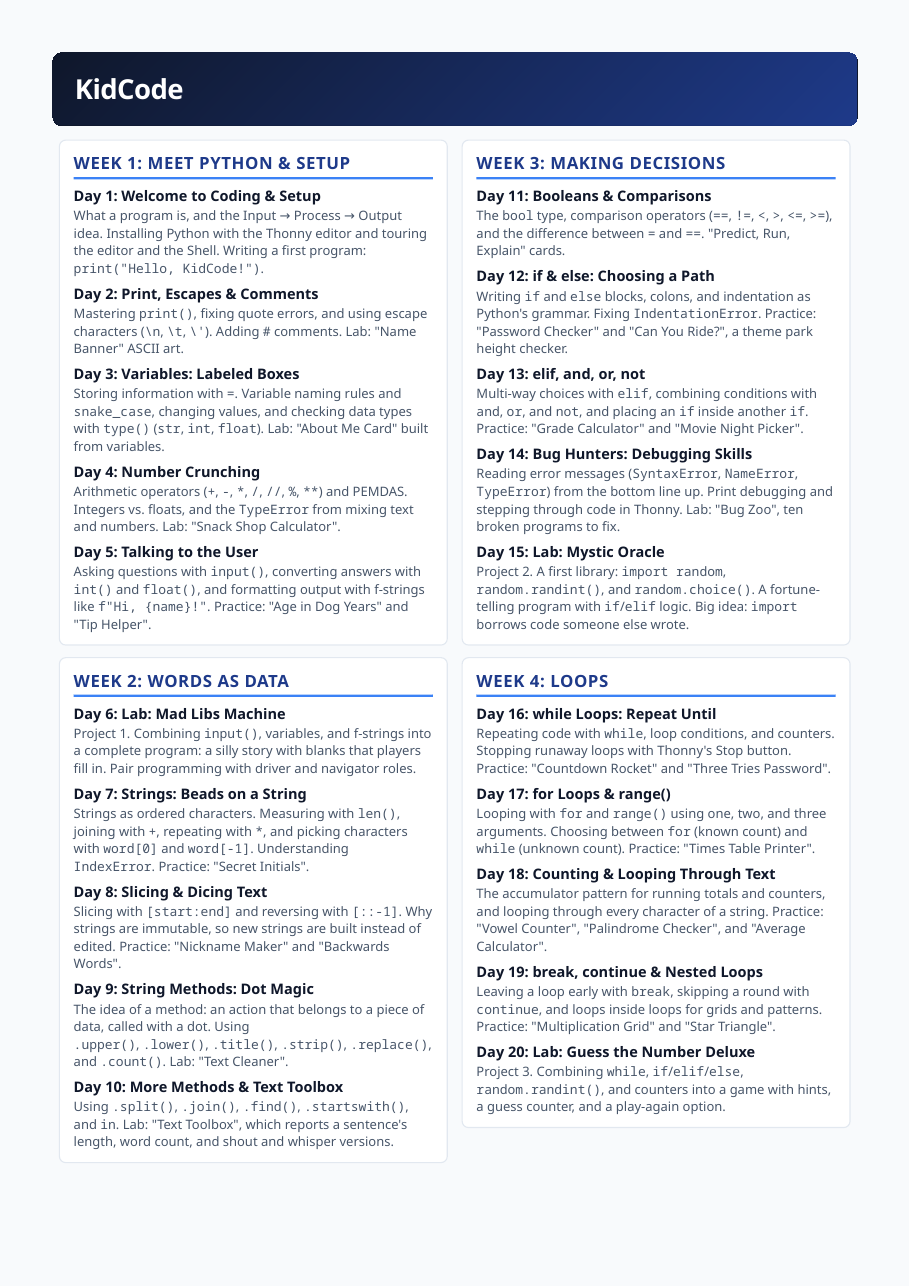
Forty one-hour classes over eight weeks (five per week), with 6 projects: 1 Mad Libs Machine 2 Mystic Oracle 3 Guess the Number Deluxe 4 Wish List Manager 5 Trivia Quiz Show 6 Escape the Haunted School
Day by day
| Day | Topic | What students did | What they learned |
|---|---|---|---|
| 1 | Welcome to Coding & Setup Meet Python & Setup | What a program is, and the Input → Process → Output idea. Installing Python with the Thonny editor and touring the editor and the Shell. Writing a first program: print("Hello, KidCode!"). | Explain a program as Input -> Process -> Output; install Thonny and run a first program |
| 2 | Print, Escapes & Comments Meet Python & Setup | Mastering print(), fixing quote errors, and using escape characters (\n, \t, \'). Adding # comments. Lab: "Name Banner" ASCII art. | Use print(), escape characters and comments; diagnose quote errors |
| 3 | Variables: Labeled Boxes Meet Python & Setup | Storing information with =. Variable naming rules and snake_case, changing values, and checking data types with type() (str, int, float). Lab: "About Me Card" built from variables. | Store and change values in named variables and identify basic data types |
| 4 | Number Crunching Meet Python & Setup | Arithmetic operators (+, -, *, /, //, %, **) and PEMDAS. Integers vs. floats, and the TypeError from mixing text and numbers. Lab: "Snack Shop Calculator". | Do arithmetic in Python; explain int vs float and the TypeError from mixing text and numbers |
| 5 | Talking to the User Meet Python & Setup | Asking questions with input(), converting answers with int() and float(), and formatting output with f-strings like f"Hi, {name}!". Practice: "Age in Dog Years" and "Tip Helper". | Read user input, convert types, and format output with f-strings |
| 6 | Lab: Mad Libs Machine Words As Data | Project 1. Combining input(), variables, and f-strings into a complete program: a silly story with blanks that players fill in. Pair programming with driver and navigator roles. | Combine input(), variables and f-strings into one complete program |
| 7 | Strings: Beads on a String Words As Data | Strings as ordered characters. Measuring with len(), joining with +, repeating with *, and picking characters with word[0] and word[-1]. Understanding IndexError. Practice: "Secret Initials". | Treat strings as ordered characters: measure, join, repeat and index them |
| 8 | Slicing & Dicing Text Words As Data | Slicing with [start:end] and reversing with [::-1]. Why strings are immutable, so new strings are built instead of edited. Practice: "Nickname Maker" and "Backwards Words". | Slice and reverse strings and explain why strings are immutable |
| 9 | String Methods: Dot Magic Words As Data | The idea of a method: an action that belongs to a piece of data, called with a dot. Using .upper(), .lower(), .title(), .strip(), .replace(), and .count(). Lab: "Text Cleaner". | Transform text by calling string methods |
| 10 | More Methods & Text Toolbox Words As Data | Using .split(), .join(), .find(), .startswith(), and in. Lab: "Text Toolbox", which reports a sentence's length, word count, and shout and whisper versions. | Analyze a sentence with split/join/find/startswith and the in operator |
| 11 | Booleans & Comparisons Making Decisions | The bool type, comparison operators (==, !=, <, >, <=, >=), and the difference between = and ==. "Predict, Run, Explain" cards. | Write Boolean expressions with comparison operators and distinguish = from == |
| 12 | if & else: Choosing a Path Making Decisions | Writing if and else blocks, colons, and indentation as Python's grammar. Fixing IndentationError. Practice: "Password Checker" and "Can You Ride?", a theme park height checker. | Write if/else blocks with correct colons and indentation |
| 13 | elif, and, or, not Making Decisions | Multi-way choices with elif, combining conditions with and, or, and not, and placing an if inside another if. Practice: "Grade Calculator" and "Movie Night Picker". | Build multi-way decisions with elif and combined conditions |
| 14 | Bug Hunters: Debugging Skills Making Decisions | Reading error messages (SyntaxError, NameError, TypeError) from the bottom line up. Print debugging and stepping through code in Thonny. Lab: "Bug Zoo", ten broken programs to fix. | Read error messages and debug systematically |
| 15 | Lab: Mystic Oracle Making Decisions | Project 2. A first library: import random, random.randint(), and random.choice(). A fortune- telling program with if/elif logic. Big idea: import borrows code someone else wrote. | Use a first library (random) inside a branching program |
| 16 | while Loops: Repeat Until Loops | Repeating code with while, loop conditions, and counters. Stopping runaway loops with Thonny's Stop button. Practice: "Countdown Rocket" and "Three Tries Password". | Repeat code with while loops and counters and stop runaway loops |
| 17 | for Loops & range() Loops | Looping with for and range() using one, two, and three arguments. Choosing between for (known count) and while (unknown count). Practice: "Times Table Printer". | Loop with for and range() and choose between for and while |
| 18 | Counting & Looping Through Text Loops | The accumulator pattern for running totals and counters, and looping through every character of a string. Practice: "Vowel Counter", "Palindrome Checker", and "Average Calculator". | Apply the accumulator pattern and loop through the characters of a string |
| 19 | break, continue & Nested Loops Loops | Leaving a loop early with break, skipping a round with continue, and loops inside loops for grids and patterns. Practice: "Multiplication Grid" and "Star Triangle". | Control loops with break/continue and build patterns with nested loops |
| 20 | Lab: Guess the Number Deluxe Loops | Project 3. Combining while, if/elif/else, random.randint(), and counters into a game with hints, a guess counter, and a play-again option. | Combine while, conditionals, random and counters into a complete game |
| 21 | Lists: Organizing Many Things Lists & Tuples | Creating lists with [], zero-based indexing, negative indexes, len(), and slicing with [start:end]. Comparing lists with strings. Practice: "Top 5 Ranker". | Create, index and slice lists |
| 22 | List Methods & Mutability Lists & Tuples | Changing lists in place with .append(), .insert(), .remove(), .pop(), .sort(), and .reverse(). Membership tests with in and not in. Practice: "Playlist Editor". | Modify lists in place and test membership |
| 23 | Looping Over Lists & Tuples Lists & Tuples | Using for item in my_list, building new lists in a loop, and finding totals, maximums, and minimums. Tuples as read-only lists, and unpacking like x, y = point. | Loop over lists to build new lists and find totals, maximums and minimums; use tuples |
| 24 | Words in a List Lists & Tuples | Turning text into lists with .split() and back into text with .join(). Sorting words and finding the longest word. Lab: "Sentence Scrambler" that shuffles a sentence. | Convert between text and lists; sort words and find the longest |
| 25 | Lab: Wish List Manager Lists & Tuples | Project 4. A menu-driven program that combines while, input(), if/elif, and lists to add, remove, and show items. Design the menu on paper first, then test in pairs. | Design and build a menu-driven program around a list |
| 26 | Dictionaries: Key-Value Pairs Dictionaries & Data | Creating dictionaries with {}, looking up values by key, and adding, changing, and deleting entries. Checking keys with in, and why KeyError appears. Practice: "Pet Profile". | Create and edit dictionaries and explain KeyError |
| 27 | Looping Through Dictionaries Dictionaries & Data | Using .keys(), .values(), .items(), and .get() with default values. Counting with dictionaries and choosing between a list and a dictionary. | Iterate over dictionaries, count with them, and choose between list and dictionary |
| 28 | Lab: Word Counter Dictionaries & Data | Using .split(), loops, and a dictionary to count how often each word appears in a sentence, then finding the most common word. A first taste of text analysis. | Count word frequencies with split, loops and a dictionary |
| 29 | Lists of Dictionaries Dictionaries & Data | Storing many records, such as students or trivia questions, as a list of dictionaries. Looping through records and reading fields by key. Practice: "Class Directory". | Represent many records as a list of dictionaries |
| 30 | Lab: Trivia Quiz Show Dictionaries & Data | Project 5. Questions and answers stored in a list of dictionaries, with score keeping. Accepting messy answers with .lower() and .strip(), and printing the score with an f-string. | Build a scored quiz from a list of dictionaries that tolerates messy answers |
| 31 | Functions: Reusable Recipes Functions | Defining functions with def, calling them, and why functions keep code tidy (Don't Repeat Yourself). Reading function definitions like recipes. Practice: "Greeting Machine". | Define and call functions and explain Don't Repeat Yourself |
| 32 | Parameters & Arguments Functions | Passing information into functions with one or more parameters and default values. Positional and keyword arguments. Practice: "Area Calculator" and "Custom Cheer". | Pass information into functions with parameters and default values |
| 33 | return Values Functions | return versus print(), storing a function's result in a variable, and returning True or False. Practice: "Even or Odd?" and "Is It a Palindrome?" as functions. | Distinguish return from print() and return True/False from functions |
| 34 | Scope, Docstrings & Testing Functions | Local vs. global variables, docstrings that explain a function, and testing with sample inputs and expected outputs. Lab: "Function Detective" fixes broken functions. | Explain scope, document functions with docstrings, and test with sample inputs |
| 35 | Lab: Refactor Day Functions | Rewriting older programs, including "Word Counter" and "Trivia Quiz Show", as clean functions with clear names. Comparing before-and-after code with a partner. | Refactor earlier programs into clean, well-named functions |
| 36 | Capstone I: Haunted School Plan Capstone & Showcase | Project 6. Planning a text adventure called "Escape the Haunted School": sketching the map, listing rooms, items, and win and lose conditions, and drawing a flowchart of the game loop. | Plan a text adventure: map, rooms, items, win/lose conditions and a game-loop flowchart |
| 37 | Capstone II: Rooms & Movement Capstone & Showcase | Storing rooms in a dictionary, moving with go north commands, and writing the while game loop. Handling unknown commands politely, with a helper function for each action. | Store rooms in a dictionary and implement movement in a while game loop |
| 38 | Capstone III: Items & Inventory Capstone & Showcase | Adding an inventory list, take and use commands, locked doors, and a win condition. Testing each feature as it is added and keeping a bug list. | Add inventory, take/use commands, locked doors and a win condition; test incrementally |
| 39 | Playtest & Polish Capstone & Showcase | Peer playtesting with "Two Stars and a Wish" feedback cards, bug fixing, and adding room descriptions and ASCII art. Stretch goals: health points and a secret ending. | Playtest peers' games, give structured feedback, fix bugs and polish |
| 40 | Showcase Day & Year Review Capstone & Showcase | Presenting games to classmates and guests. A "Python Trivia" review relay of Weeks 1 to 8, a skills checklist, and a preview of Year 2: files, classes, and libraries. | Present finished games and review the year's skills |
Building bigger programs
Testing with assert, ciphers and file storage, JSON, error handling, classes and inheritance, libraries and text analysis.
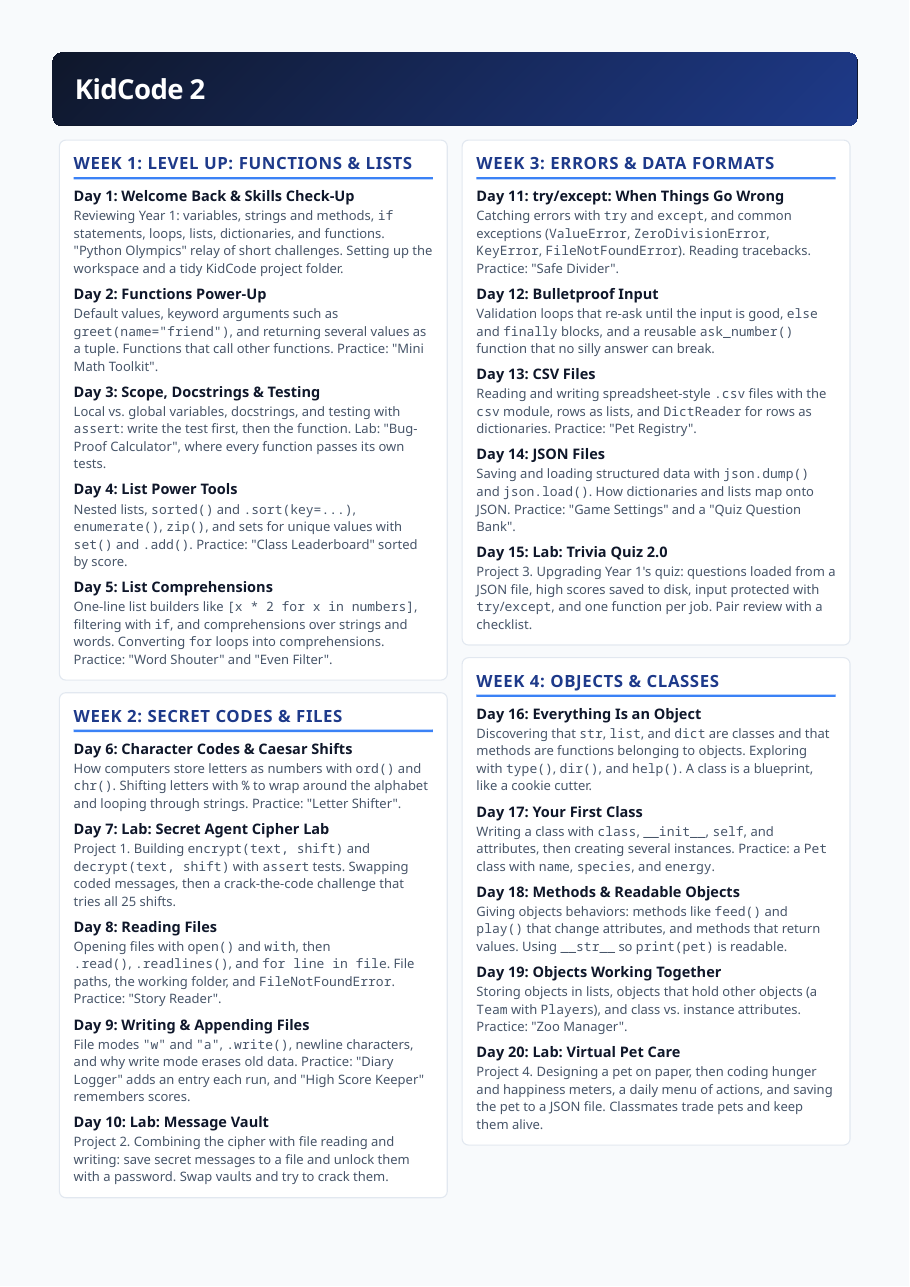
Forty one-hour classes over eight weeks (five per week), with 7 projects: 7 Secret Agent Cipher Lab 8 Message Vault 9 Trivia Quiz 2.0 10 Virtual Pet Care 11 Monster Battle Arena 12 Turtle Art Studio 13 Book Detective
Day by day
| Day | Topic | What students did | What they learned |
|---|---|---|---|
| 1 | Welcome Back & Skills Check-Up Level Up: Functions & Lists | Reviewing Year 1: variables, strings and methods, if statements, loops, lists, dictionaries, and functions. "Python Olympics" relay of short challenges. Setting up the workspace and a tidy KidCode project folder. | Review Year 1 skills and set up a tidy project workspace |
| 2 | Functions Power-Up Level Up: Functions & Lists | Default values, keyword arguments such as greet(name="friend"), and returning several values as a tuple. Functions that call other functions. Practice: "Mini Math Toolkit". | Use default values, keyword arguments and multiple return values; compose functions |
| 3 | Scope, Docstrings & Testing Level Up: Functions & Lists | Local vs. global variables, docstrings, and testing with assert: write the test first, then the function. Lab: "Bug- Proof Calculator", where every function passes its own tests. | Explain scope and write docstrings and assert tests before the function |
| 4 | List Power Tools Level Up: Functions & Lists | Nested lists, sorted() and .sort(key=...), enumerate(), zip(), and sets for unique values with set() and .add(). Practice: "Class Leaderboard" sorted by score. | Use nested lists, sorting with keys, enumerate, zip and sets |
| 5 | List Comprehensions Level Up: Functions & Lists | One-line list builders like [x * 2 for x in numbers], filtering with if, and comprehensions over strings and words. Converting for loops into comprehensions. Practice: "Word Shouter" and "Even Filter". | Write list comprehensions and convert for loops into them |
| 6 | Character Codes & Caesar Shifts Secret Codes & Files | How computers store letters as numbers with ord() and chr(). Shifting letters with % to wrap around the alphabet and looping through strings. Practice: "Letter Shifter". | Explain character codes and shift letters with modular arithmetic |
| 7 | Lab: Secret Agent Cipher Lab Secret Codes & Files | Project 1. Building encrypt(text, shift) and decrypt(text, shift) with assert tests. Swapping coded messages, then a crack-the-code challenge that tries all 25 shifts. | Build encrypt/decrypt functions with assert tests and analyze the cipher's weakness |
| 8 | Reading Files Secret Codes & Files | Opening files with open() and with, then .read(), .readlines(), and for line in file. File paths, the working folder, and FileNotFoundError. Practice: "Story Reader". | Read text files with open()/with and handle path errors |
| 9 | Writing & Appending Files Secret Codes & Files | File modes "w" and "a", .write(), newline characters, and why write mode erases old data. Practice: "Diary Logger" adds an entry each run, and "High Score Keeper" remembers scores. | Write and append to files and explain why write mode erases data |
| 10 | Lab: Message Vault Secret Codes & Files | Project 2. Combining the cipher with file reading and writing: save secret messages to a file and unlock them with a password. Swap vaults and try to crack them. | Combine the cipher with file I/O in a password-protected message store |
| 11 | try/except: When Things Go Wrong Errors & Data Formats | Catching errors with try and except, and common exceptions (ValueError, ZeroDivisionError, KeyError, FileNotFoundError). Reading tracebacks. Practice: "Safe Divider". | Catch and handle exceptions with try/except and read tracebacks |
| 12 | Bulletproof Input Errors & Data Formats | Validation loops that re-ask until the input is good, else and finally blocks, and a reusable ask_number() function that no silly answer can break. | Build validation loops and a reusable input function using else and finally |
| 13 | CSV Files Errors & Data Formats | Reading and writing spreadsheet-style .csv files with the csv module, rows as lists, and DictReader for rows as dictionaries. Practice: "Pet Registry". | Read and write CSV files with the csv module |
| 14 | JSON Files Errors & Data Formats | Saving and loading structured data with json.dump() and json.load(). How dictionaries and lists map onto JSON. Practice: "Game Settings" and a "Quiz Question Bank". | Save and load structured data as JSON |
| 15 | Lab: Trivia Quiz 2.0 Errors & Data Formats | Project 3. Upgrading Year 1's quiz: questions loaded from a JSON file, high scores saved to disk, input protected with try/except, and one function per job. Pair review with a checklist. | Upgrade Year 1's quiz with JSON storage, saved high scores, try/except and one function per job |
| 16 | Everything Is an Object Objects & Classes | Discovering that str, list, and dict are classes and that methods are functions belonging to objects. Exploring with type(), dir(), and help(). A class is a blueprint, like a cookie cutter. | Explain that str/list/dict are classes and methods belong to objects; explore with type/dir/help |
| 17 | Your First Class Objects & Classes | Writing a class with class, __init__, self, and attributes, then creating several instances. Practice: a Pet class with name, species, and energy. | Write a first class with __init__, self and attributes and create instances |
| 18 | Methods & Readable Objects Objects & Classes | Giving objects behaviors: methods like feed() and play() that change attributes, and methods that return values. Using __str__ so print(pet) is readable. | Give objects behaviors with methods and readable printing via __str__ |
| 19 | Objects Working Together Objects & Classes | Storing objects in lists, objects that hold other objects (a Team with Players), and class vs. instance attributes. Practice: "Zoo Manager". | Compose objects: lists of objects, objects holding objects, class vs instance attributes |
| 20 | Lab: Virtual Pet Care Objects & Classes | Project 4. Designing a pet on paper, then coding hunger and happiness meters, a daily menu of actions, and saving the pet to a JSON file. Classmates trade pets and keep them alive. | Design a class on paper and implement a persistent virtual pet program |
| 21 | Inheritance: Parents & Children Inheritance & The Arena | Child classes that inherit from a parent class, super().__init__(), and overriding methods. Practice: an Animal parent with Dog and Cat children that each speak() differently. | Use inheritance: child classes, super().__init__() and method overriding |
| 22 | Polymorphism & isinstance() Inheritance & The Arena | Treating different objects the same way: looping through a mixed list of animals and calling the same method. Using isinstance() and planning class families on paper. | Apply polymorphism and isinstance(); plan class families on paper |
| 23–24 | Lab: Monster Battle Arena Inheritance & The Arena | Project 5. A Monster parent class with name, hp, and attack, plus FireMonster and WaterMonster children. A turn-based battle loop with random damage, type advantages, and a saved "Hall of Fame". | Design a class hierarchy for a turn-based battle game |
| 25 | Code Review & Bug Bounty Inheritance & The Arena | Swapping projects and hunting bugs with a checklist: clear names, docstrings, functions that do one job, and passing tests. Kind, specific feedback, then refactoring. | Review peers' code against a checklist and refactor from feedback |
| 26 | Modules & the Standard Library Libraries & Modules | A module is a .py file of ready-made tools and a library is a collection of them. Using import, from ... import, and as. Touring math, random, datetime, string, and collections. | Import modules and tour the standard library |
| 27 | Your Own Module & the Docs Libraries & Modules | Moving helpers like the cipher and ask_number() into kidtools.py and importing them. Reading Python's official documentation: finding a function and reading its signature. | Move helpers into your own module and read Python's official documentation |
| 28 | Lab: Turtle Art Studio Libraries & Modules | Project 6. Using the built-in turtle library: turtle objects with methods such as forward(), left(), and begin_fill(). Loops and functions draw spirals, stars, and a draw_flower() function. | Draw with the turtle library using objects, loops and functions |
| 29 | pip & Third-Party Libraries Libraries & Modules | What PyPI is and how pip install works, and the difference between a module, package, and library. Installing rich for colorful text, reading a README, and fixing a failed install safely. | Install and use a third-party library with pip and explain module/package/library |
| 30 | Lab: Class Survey Dashboard Libraries & Modules | Installing matplotlib and drawing bar charts with plt.bar(), titles, labels, and plt.show(). Loading survey answers from a CSV file and charting the results. KidCode 2 Curriculum S | Install matplotlib and chart survey results loaded from a CSV |
| 31 | Loading & Cleaning Text Text As Data | Loading a public-domain book from Project Gutenberg as a text file. Cleaning it with .lower(), string.punctuation, and .split(), and finding unique words with sets. | Load and clean a public-domain book as text data |
| 32 | Counting Words with Counter Text As Data | Using collections.Counter and .most_common() to rank words, and stop-word lists to skip "the" and "and". Practice: "Top 10 Words" for any text file. | Rank words with collections.Counter and skip stop words |
| 33 | Lab: Word Frequency Chart Text As Data | Charting a book's top words with matplotlib and comparing two books: which words define each story? Adding average word length and vocabulary size to the report. | Chart word frequencies and compare two books |
| 34 | Comparing Texts with Sets Text As Data | Set operations &, |, and - to find shared and unique words between two texts. Measuring lexical diversity (unique words divided by total words). Practice: "Author Fingerprint". | Compare texts with set operations and measure lexical diversity |
| 35 | Language Is Tricky: Bug Safari Text As Data | Testing our code on tricky text: .split(".") breaks on "Dr. Smith" and "U.S.A.", and .split() leaves punctuation stuck to words. Logging every failure as a cliffhanger for Year 3. | Test text code on tricky language and log every failure |
| 36 | Capstone I: Book Detective Plan Capstone & Showcase | Project 7. Planning a TextAnalyzer class that loads a book and reports total words, unique words, longest word, average word length, and top words. Sketching attributes and methods on paper. | Plan a TextAnalyzer class for book analysis |
| 37 | Capstone II: Building the Core Capstone & Showcase | Coding the class: loading a file with try/except, cleaning text, counting with Counter, and one method per statistic. Testing each method with assert. | Implement the TextAnalyzer core with file loading, cleaning, Counter and assert-tested methods |
| 38 | Capstone III: Charts & Reports Capstone & Showcase | Adding a matplotlib chart method, saving a full text report to a file, and letting users pick a book from a menu. Reusing functions from kidtools.py. | Add a chart method, saved reports and a book menu; reuse kidtools |
| 39 | Playtest, Polish & Debug Capstone & Showcase | Swapping projects so testers can try to break them with odd files. Fixing bugs, adding docstrings, and rehearsing a three-minute demo. | Swap projects to break them with odd files; fix, document and rehearse a demo |
| 40 | Showcase Day & Year 3 Preview Capstone & Showcase | Presenting Book Detective reports to classmates and guests, plus a skills checklist. Preview of KidCode 3: the sentences that broke our code are what NLP and the spaCy library are built to solve. | Present Book Detective reports and preview Year 3 |
Natural-language processing
spaCy tokens, stop words, lemmas, sentences, parts of speech, named entities, rule-based matching and a rule-based chatbot.
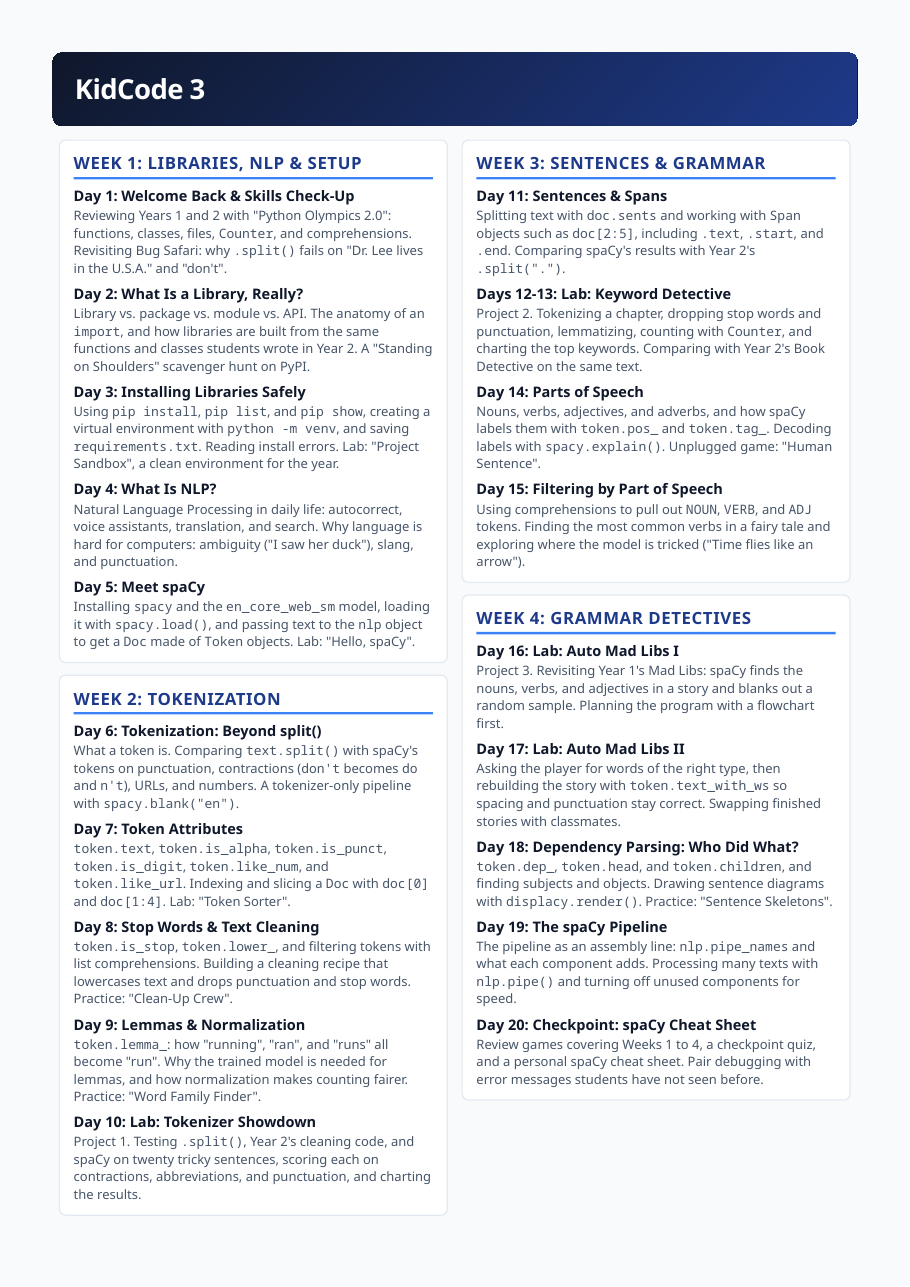
Forty one-hour classes over eight weeks (five per week), with 7 projects: 14 Tokenizer Showdown 15 Keyword Detective 16 Auto Mad Libs 17 Character Tracker 18 Privacy Shield 19 KidBot Brain 20 NLP Capstone
Day by day
| Day | Topic | What students did | What they learned |
|---|---|---|---|
| 1 | Welcome Back & Skills Check-Up Libraries, Nlp & Setup | Reviewing Years 1 and 2 with "Python Olympics 2.0": functions, classes, files, Counter, and comprehensions. Revisiting Bug Safari: why .split() fails on "Dr. Lee lives in the U.S.A." and "don't". | Review Years 1-2 and see why .split() fails on real sentences |
| 2 | What Is a Library, Really? Libraries, Nlp & Setup | Library vs. package vs. module vs. API. The anatomy of an import, and how libraries are built from the same functions and classes students wrote in Year 2. A "Standing on Shoulders" scavenger hunt on PyPI. | Distinguish library, package, module and API and trace how libraries are built from functions and classes |
| 3 | Installing Libraries Safely Libraries, Nlp & Setup | Using pip install, pip list, and pip show, creating a virtual environment with python -m venv, and saving requirements.txt. Reading install errors. Lab: "Project Sandbox", a clean environment for the year. | Create an isolated environment and install libraries safely |
| 4 | What Is NLP? Libraries, Nlp & Setup | Natural Language Processing in daily life: autocorrect, voice assistants, translation, and search. Why language is hard for computers: ambiguity ("I saw her duck"), slang, and punctuation. | Explain what NLP is and why language is hard for computers |
| 5 | Meet spaCy Libraries, Nlp & Setup | Installing spacy and the en_core_web_sm model, loading it with spacy.load(), and passing text to the nlp object to get a Doc made of Token objects. Lab: "Hello, spaCy". | Install spaCy and its model and turn text into a Doc of Tokens |
| 6 | Tokenization: Beyond split() Tokenization | What a token is. Comparing text.split() with spaCy's tokens on punctuation, contractions (don't becomes do and n't), URLs, and numbers. A tokenizer-only pipeline with spacy.blank("en"). | Compare split() with spaCy tokenization on messy text |
| 7 | Token Attributes Tokenization | token.text, token.is_alpha, token.is_punct, token.is_digit, token.like_num, and token.like_url. Indexing and slicing a Doc with doc[0] and doc[1:4]. Lab: "Token Sorter". | Inspect token attributes and index/slice a Doc |
| 8 | Stop Words & Text Cleaning Tokenization | token.is_stop, token.lower_, and filtering tokens with list comprehensions. Building a cleaning recipe that lowercases text and drops punctuation and stop words. Practice: "Clean-Up Crew". | Clean text by removing stop words and punctuation with comprehensions |
| 9 | Lemmas & Normalization Tokenization | token.lemma_: how "running", "ran", and "runs" all become "run". Why the trained model is needed for lemmas, and how normalization makes counting fairer. Practice: "Word Family Finder". | Normalize words to lemmas and explain why normalization makes counting fairer |
| 10 | Lab: Tokenizer Showdown Tokenization | Project 1. Testing .split(), Year 2's cleaning code, and spaCy on twenty tricky sentences, scoring each on contractions, abbreviations, and punctuation, and charting the results. | Evaluate three tokenization approaches on twenty tricky sentences and chart the results |
| 11 | Sentences & Spans Sentences & Grammar | Splitting text with doc.sents and working with Span objects such as doc[2:5], including .text, .start, and .end. Comparing spaCy's results with Year 2's .split("."). | Split text into sentences and work with Span objects |
| 12–13 | Lab: Keyword Detective Sentences & Grammar | Project 2. Tokenizing a chapter, dropping stop words and punctuation, lemmatizing, counting with Counter, and charting the top keywords. Comparing with Year 2's Book Detective on the same text. | Extract and chart top keywords from a chapter using spaCy |
| 14 | Parts of Speech Sentences & Grammar | Nouns, verbs, adjectives, and adverbs, and how spaCy labels them with token.pos_ and token.tag_. Decoding labels with spacy.explain(). Unplugged game: "Human Sentence". | Explain parts of speech and read spaCy's POS labels |
| 15 | Filtering by Part of Speech Sentences & Grammar | Using comprehensions to pull out NOUN, VERB, and ADJ tokens. Finding the most common verbs in a fairy tale and exploring where the model is tricked ("Time flies like an arrow"). | Filter tokens by POS and find where the model is tricked |
| 16 | Lab: Auto Mad Libs I Grammar Detectives | Project 3. Revisiting Year 1's Mad Libs: spaCy finds the nouns, verbs, and adjectives in a story and blanks out a random sample. Planning the program with a flowchart first. | Plan an Auto Mad Libs tool that finds nouns/verbs/adjectives and blanks a random sample |
| 17 | Lab: Auto Mad Libs II Grammar Detectives | Asking the player for words of the right type, then rebuilding the story with token.text_with_ws so spacing and punctuation stay correct. Swapping finished stories with classmates. | Ask for typed words and rebuild the story preserving spacing and punctuation |
| 18 | Dependency Parsing: Who Did What? Grammar Detectives | token.dep_, token.head, and token.children, and finding subjects and objects. Drawing sentence diagrams with displacy.render(). Practice: "Sentence Skeletons". | Use dependency parsing to find subjects and objects |
| 19 | The spaCy Pipeline Grammar Detectives | The pipeline as an assembly line: nlp.pipe_names and what each component adds. Processing many texts with nlp.pipe() and turning off unused components for speed. | Explain the spaCy pipeline and process many texts efficiently |
| 20 | Checkpoint: spaCy Cheat Sheet Grammar Detectives | Review games covering Weeks 1 to 4, a checkpoint quiz, and a personal spaCy cheat sheet. Pair debugging with error messages students have not seen before. | Consolidate Weeks 1-4 with review games, a checkpoint quiz and a personal cheat sheet |
| 21 | What Are Named Entities? Named Entity Recognition | Real-world names and facts hiding in text. Using doc.ents, ent.text, ent.label_, and ent.start_char, and decoding PERSON, ORG, GPE, DATE, and MONEY with spacy.explain(). | Extract named entities and decode their labels |
| 22 | Seeing Entities with displaCy Named Entity Recognition | Highlighting entities with displacy.render(doc, style="ent") in a notebook or displacy.serve() in the browser, and saving results as HTML. Lab: "Entity Gallery" of student paragraphs. | Visualize entities with displaCy and export HTML |
| 23 | When the Model Is Wrong Named Entity Recognition | Why models guess: ambiguous names like "Washington", "Apple", and "Jordan", names from many cultures, and text without capital letters. Hand-labeling 20 sentences for an "NER Report Card". | Explain why NER models guess wrong and hand-label sentences to evaluate them |
| 24 | Lab: Character Tracker I Named Entity Recognition | Project 4. Loading a public-domain story and running one chapter at a time through nlp. Extracting PERSON and GPE entities and counting them with Counter. | Extract and count PERSON/GPE entities from a story chapter by chapter |
| 25 | Lab: Character Tracker II Named Entity Recognition | Merging name variants like "Dorothy" and "Dorothy Gale", tracking which characters appear in each chapter, and printing a "Who's Who" report. Listing what the tool gets wrong. | Merge name variants and track characters across chapters; document errors |
| 26 | Lab: Privacy Shield I Rules & Custom Entities | Project 5. Planning a redaction tool: which entity types (PERSON, GPE, ORG, DATE) to hide, what placeholders like [PERSON] look like, and how to test on sample letters. | Plan a redaction tool: entity types, placeholders and test letters |
| 27 | Lab: Privacy Shield II Rules & Custom Entities | Replacing entities while keeping the text readable, using token.ent_iob_ and token.text_with_ws so multi- word names are replaced once. Testing for names the model missed. | Replace multi-word entities once, keep text readable and test for missed names |
| 28 | Rule-Based Matching Rules & Custom Entities | Building patterns from token attributes such as {"LOWER": "hello"}, {"IS_PUNCT": True}, and {"POS": "NOUN"}. Using Matcher, matcher.add(), and matches as (match_id, start, end). | Build token-pattern rules with the Matcher |
| 29 | Teaching spaCy New Entities Rules & Custom Entities | Adding an entity ruler with nlp.add_pipe("entity_ruler", before="ner"), writing patterns for custom labels like FOOD or PET, and seeing how rules and the model work together. | Teach spaCy custom entities with an entity ruler |
| 30 | Lab: Fantasy Map Finder Rules & Custom Entities | Recognizing invented places, heroes, and creatures with entity ruler patterns, then highlighting them with displaCy. Testing what happens when a rule and the model disagree. KidCode 3 Curriculum S | Recognize invented places/heroes/creatures with rules and study rule-vs-model conflicts |
| 31 | Lab: KidBot Brain I Chatbots & Responsible Nlp | Project 6. Designing a rule-based chatbot: listing intents (greeting, joke, weather), writing Matcher patterns for each, and sketching the conversation loop. | Design a rule-based chatbot: intents and Matcher patterns |
| 32 | Lab: KidBot Brain II Chatbots & Responsible Nlp | Using entities to pull out places and dates so "What's the weather in Paris tomorrow?" gets a pretend forecast. Adding a friendly fallback reply and testing with classmates. | Use entities in the chatbot and add a fallback; test with classmates |
| 33 | How Models Learn Chatbots & Responsible Nlp | How spaCy's model learned from labeled examples, why training data shapes what a model gets right, and how mistakes and bias appear. Students annotate 20 sentences and compare with the model. | Explain how models learn from labeled examples and where bias/mistakes come from |
| 34 | Responsible NLP: Bias & Privacy Chatbots & Responsible Nlp | Fairness, privacy, and knowing when not to use NLP. Class roundtable: "Should a school use NLP to read student essays?" Writing a "Limitations" card for a personal project. | Reason about fairness, privacy and when not to use NLP |
| 35 | Capstone Pitch & Plan Chatbots & Responsible Nlp | Choosing a project: "Story Explorer", "KidBot Pro", "Privacy Shield Pro", "Time Traveler's News Desk", or an approved original idea. A one-page plan with goals, test texts, and a feature checklist. | Choose and plan a capstone project |
| 36 | Capstone Build I Capstone & Showcase | Project 7. Loading text from a file, running the spaCy pipeline, and organizing code into functions or classes. Daily stand-up check-ins: what I did, what is next, and what is blocking me. | Build a capstone core: load a file, run the spaCy pipeline, organize code |
| 37 | Capstone Build II Capstone & Showcase | Adding features: Counter charts, a displaCy HTML export, Matcher or entity ruler rules, and try/except for missing files. Writing a comment header that explains how to run the program. | Add features: charts, displaCy export, Matcher/entity-ruler rules, error handling and a run guide |
| 38 | Beta Test & NER Audit Capstone & Showcase | Swapping projects so testers can try to break them with tricky texts. Running an NER audit on each tool and logging every wrong guess in a bug list. | Beta-test peers' tools and audit NER errors |
| 39 | Polish & Demo Rehearsal Capstone & Showcase | Fixing bugs, cleaning up code, and writing "How It Works" and "Limitations" cards. Rehearsing a three-minute demo with a partner. | Polish code, write How It Works/Limitations cards and rehearse a demo |
| 40 | Showcase Day & What's Next Capstone & Showcase | Presenting projects to classmates, families, and guests, and celebrating three years of KidCode with certificates. Next steps: machine learning with scikit-learn, web apps with Flask, and games with pygame. | Present capstones and close the three-year sequence |
Some projects come back
Three projects return a year or two later at a higher level. Year 1's Mad Libs comes back in Year 3 as Auto Mad Libs, where spaCy finds the nouns, verbs and adjectives and blanks them out. Year 1's trivia quiz comes back in Year 2 with questions loaded from a JSON file, high scores saved to disk, and input protected with try/except. And Year 3 opens by testing the text-cleaning code students wrote in Year 2 against spaCy's tokenizer, on sentences like “Dr. Lee lives in the U.S.A.”